
New: see if your kit fits with the Cambags camera bag visualiser
Our new 3D visualiser lets you pick from 1,533 camera bags, add your camera, lenses and flash, and see to scale whether everything fits before you buy.
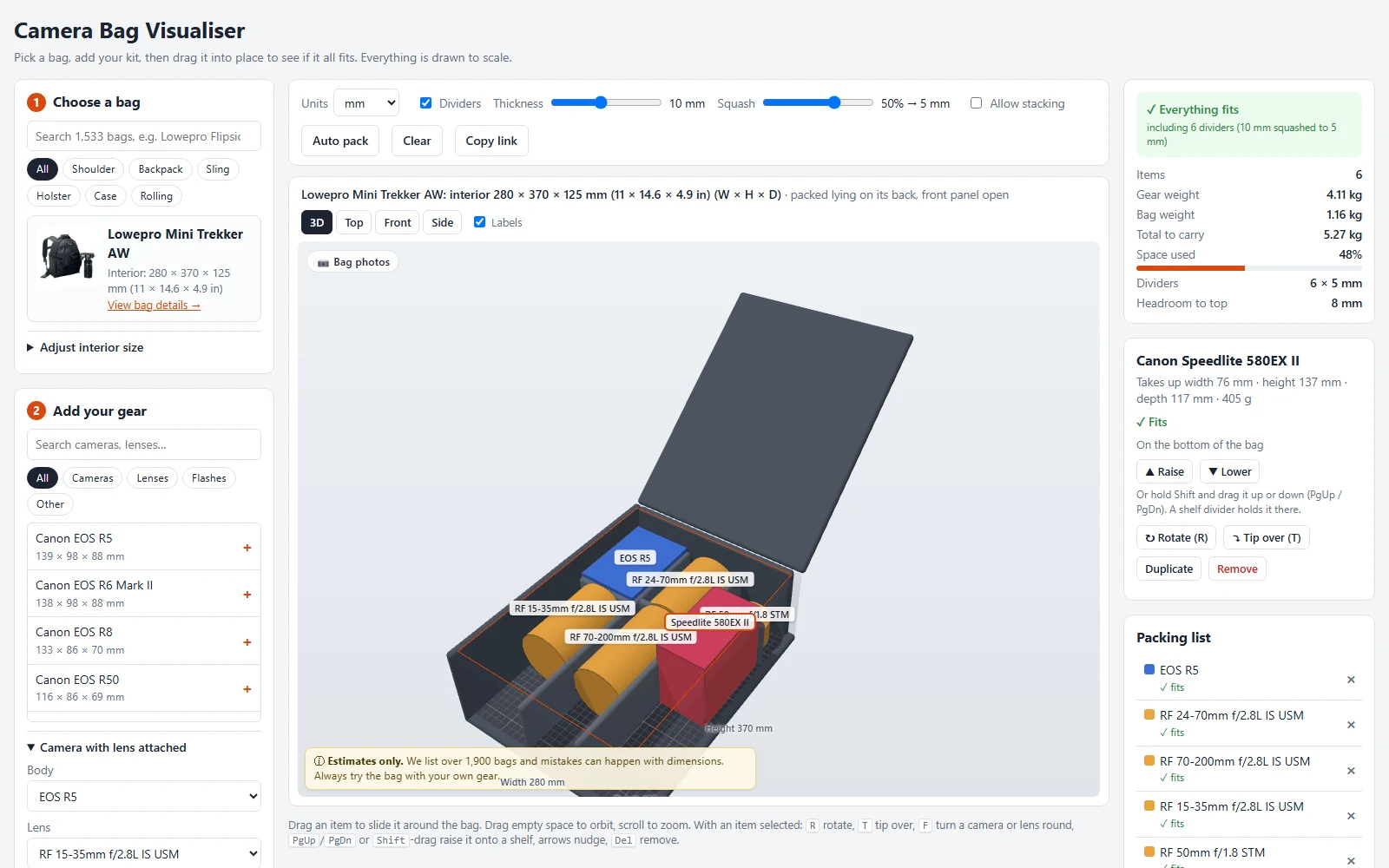
Choosing a camera bag usually means comparing interior dimensions on a spec sheet and hoping your kit will go in. The new Cambags camera bag visualiser, now in beta, shows you instead. Pick a bag, add your gear and see it packed in 3D, drawn to scale.
The visualiser covers 1,533 camera bags from 58 brands, using the interior sizes in the Cambags catalogue. Its gear library has 871 items from 25 brands, including 563 camera bodies, 254 lenses, 32 flashes and accessories such as drones and action cameras. If something is missing, you can add a custom item with your own measurements.
Drag each item around the bag, turn it, tip it over or raise it onto a shelf. Padded dividers are drawn between items, just like the velcro dividers in a real bag, and you can set how thick they are. Anything too big, sticking out of the top or overlapping turns red, and Auto pack will find a layout for you. Top, front and side views help you check the fit from every angle, and a running total shows the weight of your kit plus the bag.
In the example above, a Lowepro Mini Trekker AW takes a Canon EOS R5, four RF lenses (15-35mm, 24-70mm and 70-200mm f/2.8L, plus a 50mm f/1.8) and a Speedlite 580EX II, using 48% of the space with 5.27 kg to carry in total.
When you have packed a bag, Copy link saves the layout so you can share it or come back to it later. Each bag in the visualiser also links to its page in the catalogue, with owner reviews, photographs and full specifications.
The visualiser is a beta, so expect a few rough edges. Bag sizes come from manufacturers' published figures, more than 130 bags have had their camera compartment checked by hand, and bags whose sizes had to be estimated are marked with a warning. Always try a bag with your own gear before you buy, and if a size looks wrong, let us know through the contact page.
You will find the visualiser under Visualiser in the menu at the top of every page.